How to Download Aadhaar Card PDF Online on Phone/Computers?


Summary: Downloading Aadhaar Card PDF Online without OTP is not possible. However, this guide will explain some simple method to get Aadhaar card PDF online without it. Aadhaar card, the most widely used card in India, serves as the main identity & address proof for millions of Indians people. Losing or damaged Aadhaar card is a common problem, but now you can quickly download e-Aadhaar Card PDF online from the official portal.
The Government of India allows users to download e-Aadhaar from official portal with the Unique Identification Authority of India (UIDAI). In this blog, Cybersics expert will explain each method to download Aadhaar Card PDF online by using your Aadhaar number, enrollment ID, virtual ID, or Service ID on your mobile phone or computer.
Lost Aadhaar Card: How to Download e-Aadhaar PDF on Phone?
Losing Aadhaar card can be stressful. If you need it urgently for verification or official purposes. However, there’s no need to worry. Users can now download e-Aadhaar PDF on your phone within minutes by using some simple online process:-
Tip: e-Aadhaar Card is a digital signed PDF copy that users can be used as physical Aadhaar card. It help users when they lost, misplaced, or damaged, Aadhaar card.
Steps to Get e-Aadhaar Card Copy
- Firstly, visit UIDAI website.
- Tap on “Download Aadhaar” option.
- Enter Aadhaar Number or you can choose other option to download Aadhaar card.
- Fill Captcha.
- Click on “Send OTP.“
- Insert OTP, and download e-aadhaar PDF file.
Is this Method Useful?
Yes, this method is beneficial to all users who want Aadhaar card on mobile devices without carrying physical copy.
- Instant access in emergency.
- Once downloaded Aadhaar, no need internet to visit website.
- Safe & Secure digital Aadhaar card copy.
- Validate ID for KYC, travel, & identity verification.
Note: To open Aadhaar card PDF, users must enter their first name, four letters, and their year of birth. If your name only has three letters, enter your full name and then your year of birth to open Aadhaar card PDF.
Top Reasons to Download Aadhaar Card Online PDF on Computer
Aadhaar users often prefer downloading their Aadhaar card on PC because of several practical reasons:
- Get Aadhaar Card online on computer as a PDF to access it securely anytime. Users don’t need to rely on their mobile device to access Aadhaar card.
- It easier to print a high-quality copy of Aadhaar card when required.
- Updating Aadhaar is sometimes required on online forms, job applications, and KYC procedures; storing Aadhaar PDF on a user’s desktop is advantageous.
- A digital copy helps as backup if users lost mobile phone by any chance.
- Users can easily attach Aadhaar PDF copy & share file via email or portals with computer.
- In families, a single computer can be used to download multiple Aadhaar cards PDF.
Steps to get Aadhaar card PDF on Windows & Mac systems:-
- Copy this link & Visit: https://uidai.gov.in/
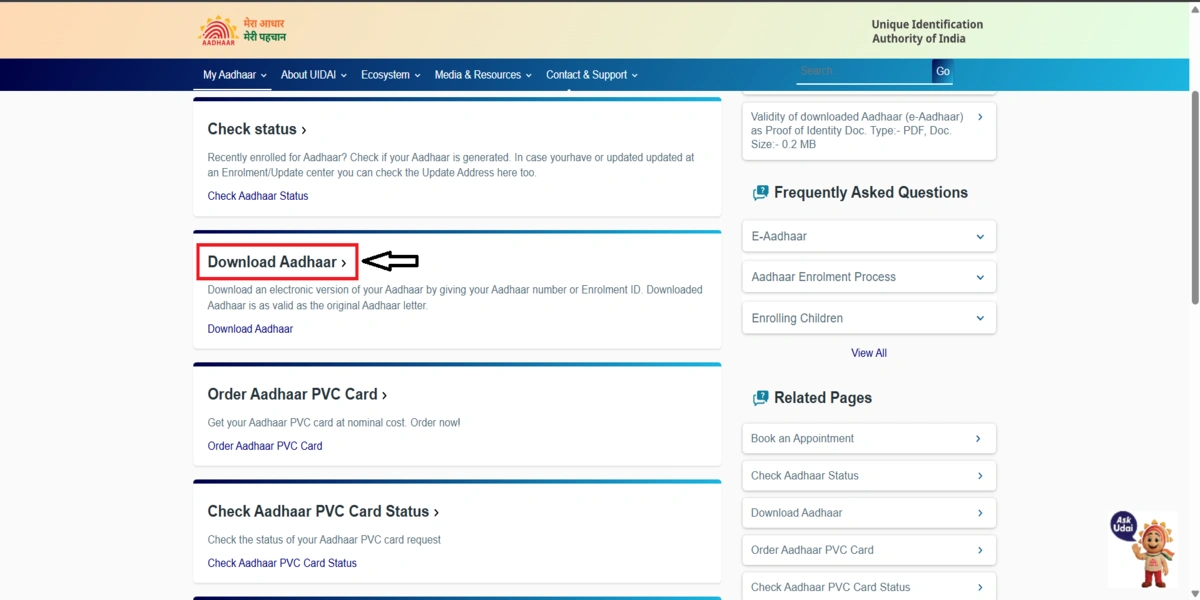
- Go to myaadhar tab or click on “Download Aadhaar” option.
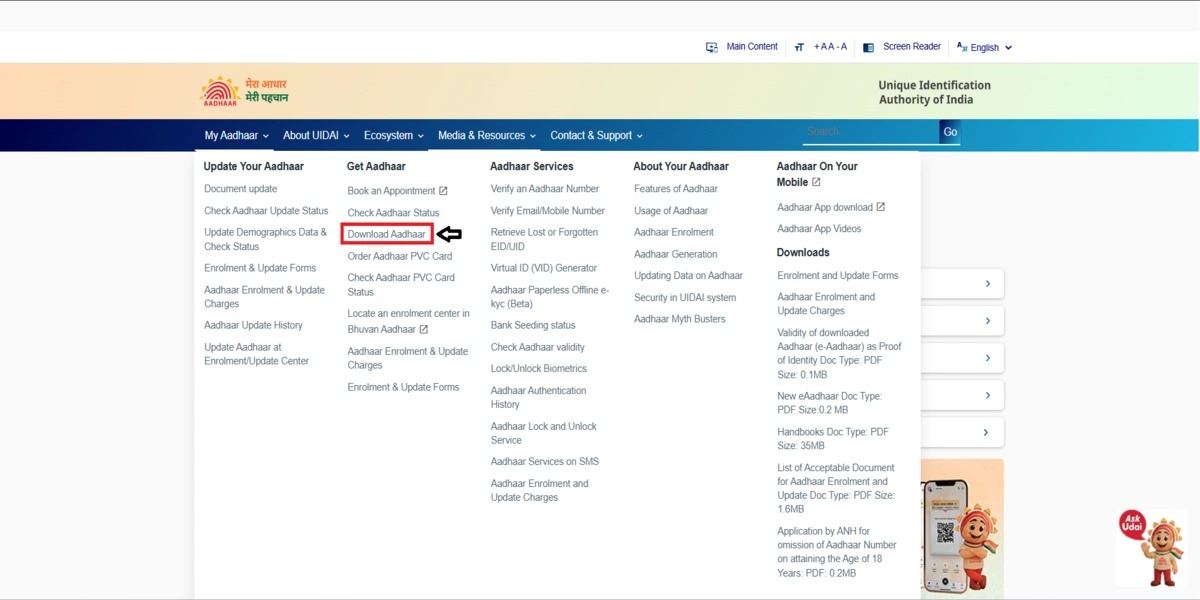
- Select any single option that shows to download aadhaar card, such as ‘Aadhaar Number’, ‘Virtual ID (VID) Number’, ‘Enrolment ID Number’, or ‘Sid Number‘.
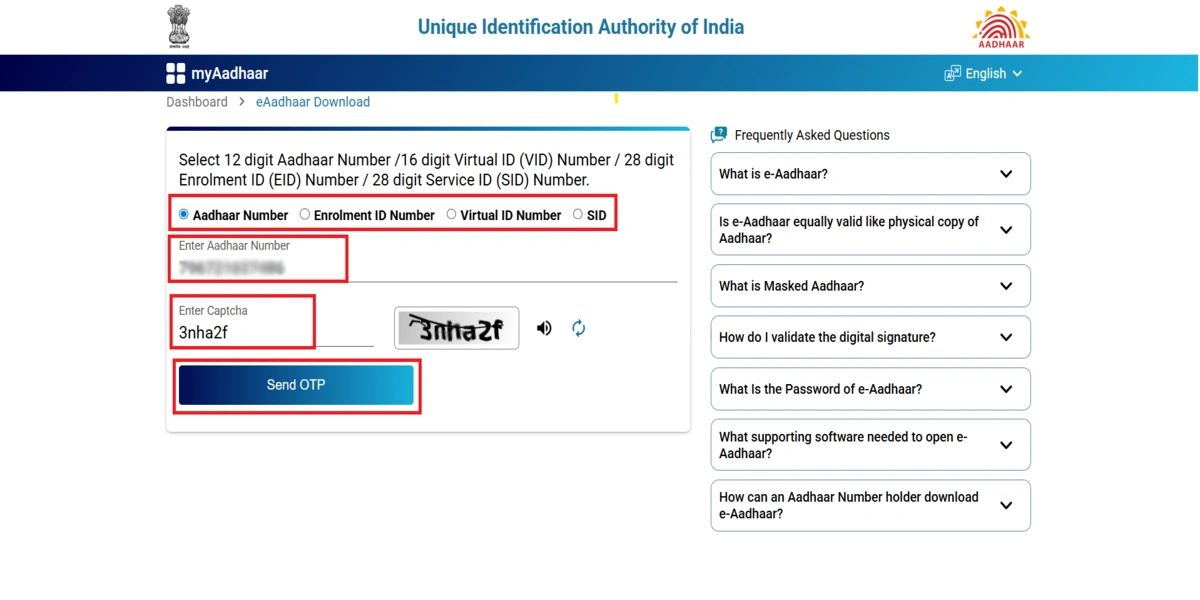
- Enter 12-Digit “Aadhaar Number” & “Captcha Code.”
- To get OTP, users need to use the registered mobile number.
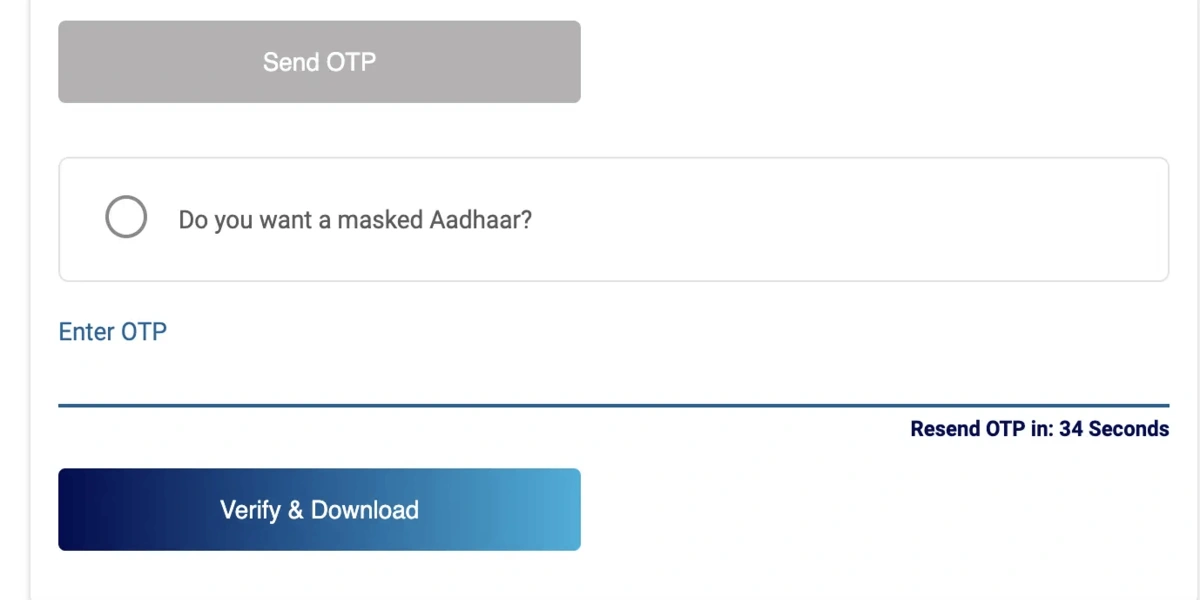
- Enter OTP, and download Aadhaar Card PDF.
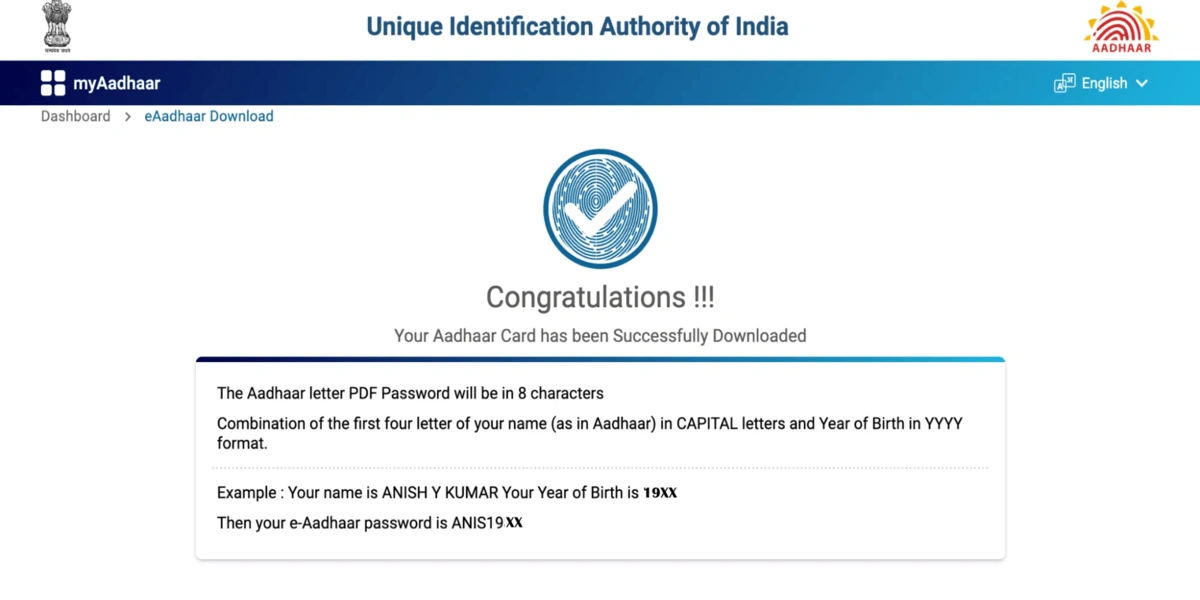
- Open Aadhaar Card PDF with any PDF reader tool.
- Enter Password.
How to Download Aadhaar PDF with UMANG Website/App?
Now there is another official government website and application available to download Aadhaar card PDF. Unified Mobile Application for New‑Age Governance, aka UMANG also help indian people to download e-Aadhaar card copy.
Download Aadhaar Card PDF by UMANG Website
- Visit Official UMANG Portal.
- Sign in with your registered mobile number.
- You will get OTP.
- Search for “Aadhaar”
- Choose “Download Aadhaar” option.
- You got a copy of your e-Aadhaar card.
Download e-Aadhaar Card by UMANG App
- Install UMANG Application on your smartphone.
- Login with your mobile number and password.
- Enter OTP and then continue the process.
- Type “Aadhaar Service” option.
- Click on “Download Aadhaar” option.
- Enter Aadhaar Card details.
- Verify again with registered mobile number OTP.
- After OTP confirmation, download your e-Aadhaar card.
4 Other Options to Download Aadhaar Card PDF
Check the latest 4 new options to download Aadhaar card PDF from the UIDAI website. If users don’t have Aadhaar Number then they can use this method to get Aadhaar card PDF copy PDF.
1. Download Aadhaar PDF with Virtual ID (VID)
Virtual ID aka VID is a 16-digit number that let everyone access Aadhaar card online safely without revealing your Aadhaar card number.
- Visit the UIDAI website.
- Click on “Download Aadhaar“.
- Select “Virtual ID” option.
- Enter “16-digit VID number“.
- Enter shown “captcha/security code“.
- Click Send “OTP“.
- Enter OTP, that was received on registered mobile number.
- Click Verify.
- Get Aadhaar card as PDF.
2. Download Aadhaar with Enrolment ID (EID)
Users can use this method to save Aadhaar Card in PDF format, if you recently applied for Aadhaar Card. This Enrolment ID helps users to download Aadhaar card online PDF without having an Aadhaar number.
- Go to the UIDAI website.
- Click Download Aadhaar.
- Choose Enrolment ID option.
- Enter 14-digit EID number.
- Select “Date” & “Time.”
- Enter the captcha code.
- Click Send OTP.
- Enter OTP that you get on registered mobile number.
- Tap on “Download Aadhaar” icon to get Aadhaar Card PDF.
Note: Users need to have an acknowledgement slip that helps download e-aadhaar card online PDF. Essentially, EID is issued immediately after applying for Aadhaar Card.
3. Save Aadhaar Card PDF Copy Online with SID
SID aka Service Request Number is generated when you update Aadhaar card details.
- Again visit the UIDAI website.
- Click “Download Aadhaar“.
- Select SID option.
- Enter “28-Digit Service Request Number“.
- Enter captcha.
- Request OTP.
- Enter received OTP on your mobile number.
- Click Download to save Aadhaar Card PDF.
Conclusion
Downloading Aadhaar card PDF online is a straightforward process that allows you to have all of the necessary information without having physical Aadhaar card. Users now have multiple options to save e-Aadhaar card copy by using Aadhaar number, Virtual ID (VID), Enrolment ID (EID), or Service Request ID (SID). Users can now access digital Aadhaar anytime on a mobile or computer. Online PDF e-Aadhaar is legally valid, password-protected, & works simply like physical card.
Anyone who is trying to “e-Aadhaar card download online pdf” should make sure to use the registered mobile number for OTP verification. To view the Aadhaar PDF, you have to enter your name and birth year specifically as they exist on your Aadhaar. By following these simple steps, everyone can keep secure digital copy of their Aadhaar card & never worry about losing again.
Frequently Asked Questions by Aadhaar Card Holders
What is my e-Aadhaar card Password?
When users download their Aadhaar card PDF online, they need a key password, but they don’t know where it’s saved or stored. Here are some simple steps to help users find their e-Aadhaar card password:
- Enter exact name & birth year as you used during Aadhaar card enrollment.
- If your name has 3 letters, then you need to use your full name + birth year.
- If your name is longer than 4 letters, then enter first 4 letters of your name in capital letters + birth year.
Can I get Aadhaar Card online pdf without password?
UDAI gives you a password-protected Aadhaar card PDF. If users want to open Aadhaar card pdf then they need a password that is essential to view PDF.
How to download Aadhaar Card PDF online without mobile number?
You can’t download Aadhaar masked card PDF without having mobile number. This requires OTP authentication, which protects privacy of individual & prevents the Aadhaar card from cybercrimes. If you need an Aadhaar card copy, go to “Aadhaar Seva Kendra” and use biometric authentication to get Aadhaar printed copy.
How to get my e-Aadhaar card PDF online?
Follow every steps to save e-Aadhaar card PDF online:-
- Visit: MyAadhaar Website 👈
- Click “Download Aadhaar” icon.
- Choose preferred option.
- Enter Aadhaar Number & captcha.
- You get OTP on registered number.
- Enter OTP and download Aadhaar card PDF.